
Sound Studio
Make music and sounds for your game
Turn the sound off in your favorite game and see how different it feels. Music tells players how to feel, and sound effects tell them what just happened.
Your first beat
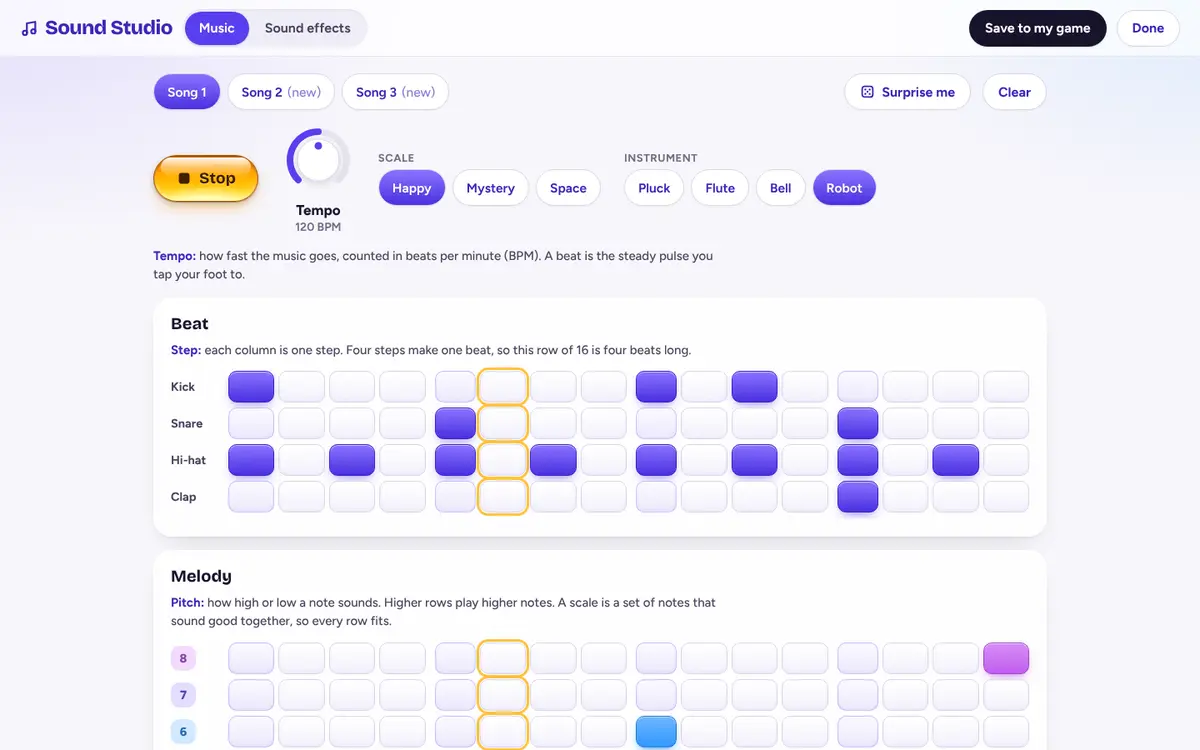
Music in the Sound Studio is a grid. Each column is one step, and the music plays them left to right, then loops. Four steps make one beat. Copy this pattern to get a beat that bounces:
Tempo
How fast the music goes, counted in beats per minute (BPM). 120 is a brisk walk.
Pitch
How high or low a note sounds. Higher rows on the melody grid play higher notes.
Scale
A set of notes that sound good together. Pick Happy, Mystery or Space and every note fits.
Instrument
The voice of a note. The same tune on Bell and on Robot sounds like two different songs.
Sound effects in four knobs
Pick a starting sound, then twist pitch, length, slide and wobble until it fits. A slide that goes up sounds like jumping. Down sounds like falling.
- Jump
- Coin
- Zap
- Boom
- Power-up
- Bonk
- Win
Match sounds to moments: a short high blip for coins, a low thud for landing, a happy run of notes for winning.
Rather describe it?
You can also ask the helper: “Make a splash sound when I land in water.” Then change it by hand. Making sounds by hand never uses energy, and neither does drawing your characters.